

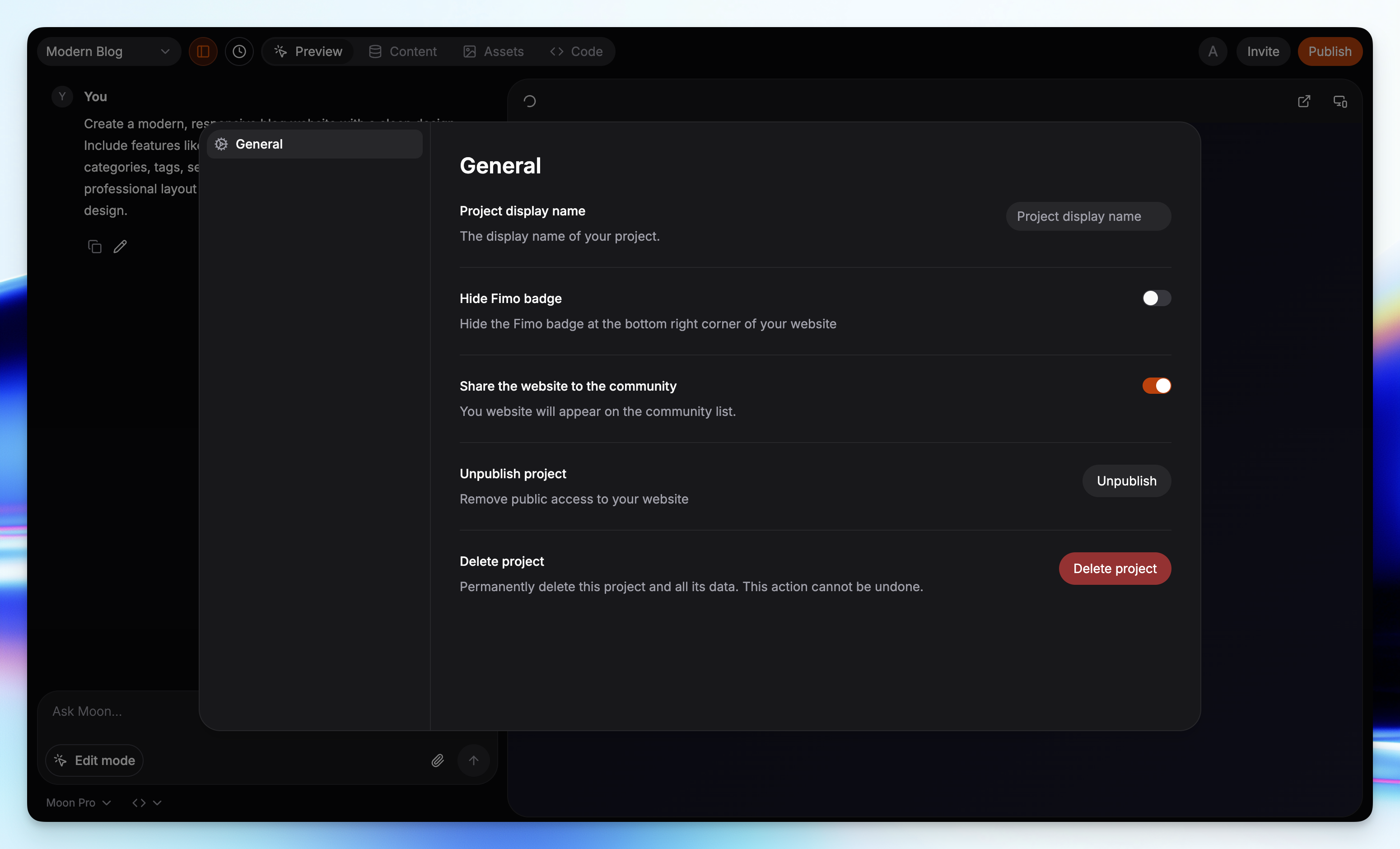
How to open Project Settings
What you can change
Project display name
Update the name of your project. This is shown across the interface and may appear in your site chrome.Fimo badge
A small badge appears at the bottom-right of your site by default.- Free plan: badge is always visible.
- Premium: you can hide the badge with a toggle.
Visibility
Control whether your site is public or private.- Public (default): anyone with the URL can view your live site.
- Private: available on Premium, hides your site from the public while keeping collaboration intact.
Unpublish project
Take the site offline without deleting anything.- Your content, code, and assets stay in the editor.
- You can publish again at any time.
Delete project
Completely remove the project and all of its data (content, code, and assets).⚠️ This action cannot be undone.
Destructive actions
• Unpublish keeps your work intact but takes the site offline.
• Delete removes the project, content, code, and assets permanently.
• Unpublish keeps your work intact but takes the site offline.
• Delete removes the project, content, code, and assets permanently.
Lifecycle controls
- Unpublish if you are iterating and want to take the live site down temporarily. You can publish again later from Publish.
- Delete project only when you are sure you no longer need the site or its assets.
Related
Publish overview
Learn how going live works.
Deployment
See the deployment flow step by step.
Billing & Usage
Upgrade to Premium for Private and badge control.