

Good to know
- Both subdomains (e.g.
www.myawesomewebsite.com) and apex/root domains (e.g.myawesomewebsite.com) are supported - Your project must be published before you can add a custom domain
- You can attach multiple domains to the same project
Why use a custom domain?
Professional branding
Use your company or personal domain to build trust and credibility.
Better SEO
Search engines favor custom domains, improving visibility and ranking.
Memorable links
Share a simple, easy-to-remember URL instead of a generated subdomain.
Flexibility
Manage your online presence under one domain and keep all projects consistent.
Every project is published by default under a free fimo.site subdomain.
Custom domains give you more control and a fully branded experience.
Custom domains give you more control and a fully branded experience.
Before you start: buy a domain
To connect a custom domain to Fimo, you first need to own a domain. Domains are purchased from a domain registrar (for example, Namecheap, GoDaddy, Cloudflare, Google Domains, OVH).Buy a domain directly from Fimo · Coming soonWe’re working on letting you search, purchase and connect a domain in one click, without leaving Fimo. In the meantime, grab a domain from any registrar and follow the steps below.
Add a custom domain
- Open your project in Fimo
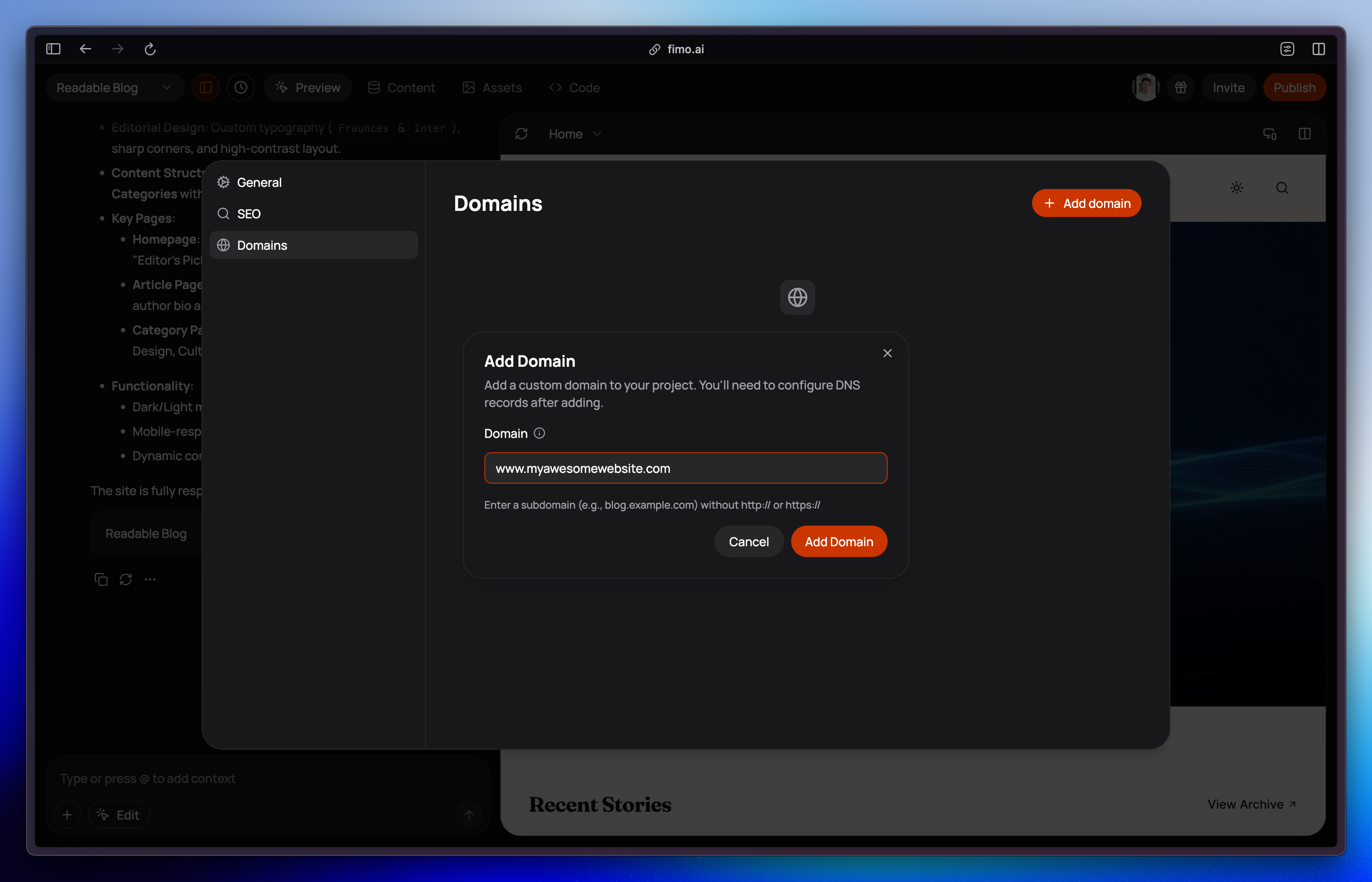
- Go to Settings → Domains
- Click Add domain
- Enter your domain — either an apex domain (
myawesomewebsite.com) or a subdomain (www.myawesomewebsite.com) - Click Add Domain
Configure your DNS
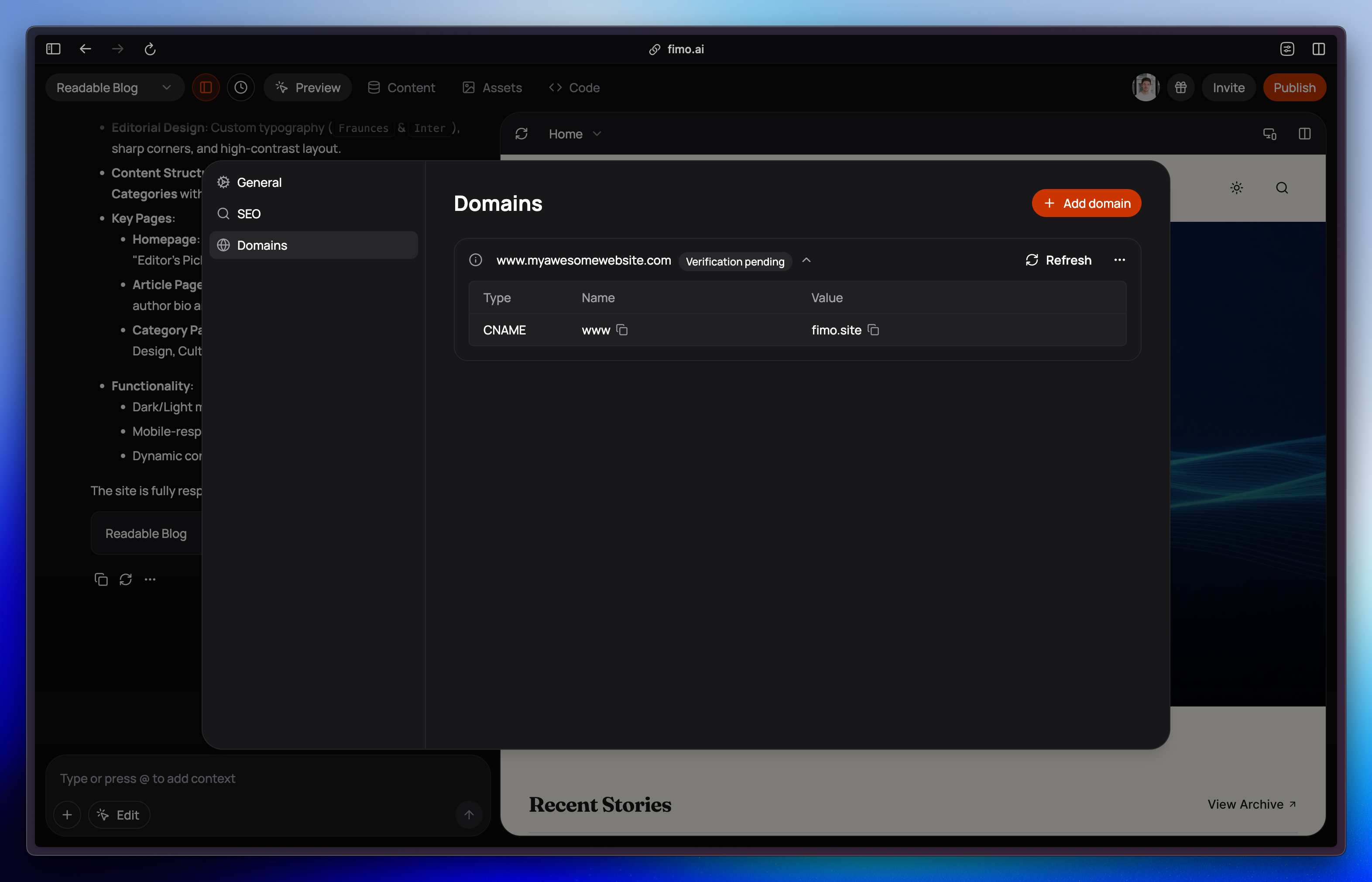
After adding the domain in Fimo, you’ll need to configure your DNS records with your domain provider (registrar). The exact records to add are shown in the Fimo Domains settings, and depend on whether you’re connecting a subdomain or an apex domain.Subdomain (e.g. www.myawesomewebsite.com)
Add a CNAME record:
| Type | Name | Value |
|---|---|---|
| CNAME | www | fimo.site |
- Type: CNAME
- Name / Host:
www(or your chosen subdomain) - Value / Target:
fimo.site
Apex / root domain (e.g. myawesomewebsite.com)
Apex domains can’t use a CNAME, so you’ll need to add the A record (or ALIAS/ANAME, if your registrar supports it) shown in your Fimo Domains settings.
| Type | Name | Value |
|---|---|---|
| A | @ | (value shown in Fimo) |
- Type: A (or ALIAS/ANAME)
- Name / Host:
@(represents the root domain) - Value / Target: the IP address displayed in Settings → Domains
Domain verification
After your DNS record is added:- Domain verification can take a few minutes to several hours
- While pending, the domain will show “Verification pending”
- Once verified, you’ll see a green check and Verified
Multiple domains
You can attach multiple custom domains to the same project.All domains will point to the same published content.